

Star Schema vs Snowflake Schema in Power BI: Which Should You Use?
Contents
When you start building Power BI reports, it’s tempting to jump straight into visuals.
But very quickly, you realise that slow refreshes, confusing relationships, and unpredictable DAX usually point to one thing: the data model.
Good modelling is the foundation of efficient Power BI, and a core skill covered in our London Power BI Course.
Two modelling approaches appear in almost every project: star schemas and snowflake schemas. They both use fact and dimension tables, but they perform very differently inside Power BI’s VertiPaq engine!
Knowing the difference will save you time, frustration, and a lot of troubleshooting.
What Is a Star Schema?
A star schema is the structure Power BI is designed to work with. Imagine one central table – the fact table, with several dimension tables radiating out from it like the points of a star.
Each dimension connects directly to the fact table using a simple one-to-many relationship.
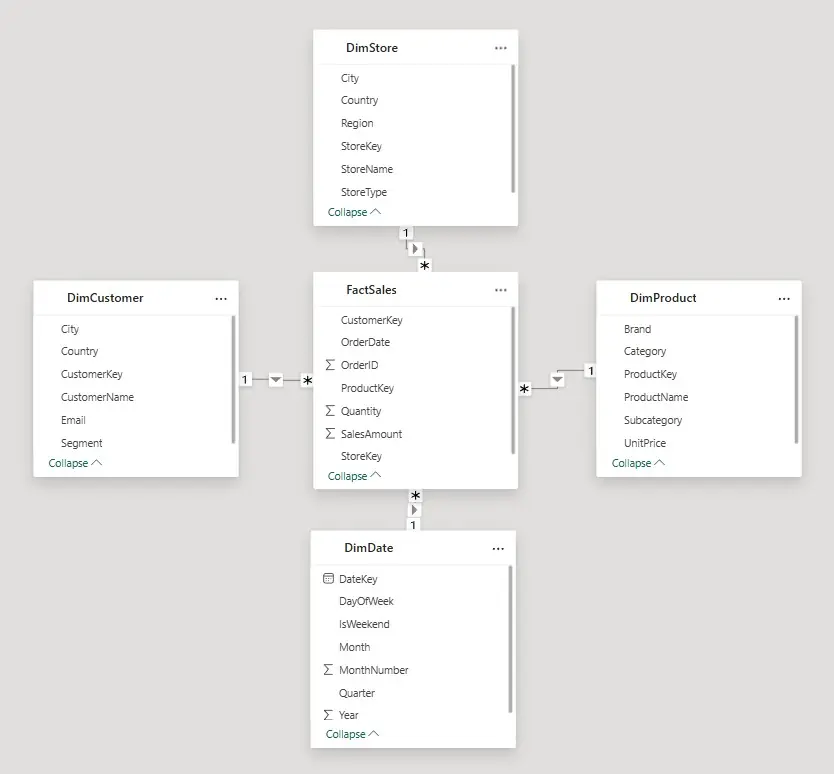
Each dimension connects directly to FactSales. Customer details, product categories, store information, and date table each sit in their own denormalised table, making the model fast, tidy, and easy to understand.
Your fact table contains measurable events such as SalesAmount, Quantity, and foreign keys to each dimension.
The dimension tables hold descriptive details such as CustomerName, City, ProductCategory, StoreRegion, or anything you want to filter and slice by.
Why Power BI loves star schemas
- Fast queries – Fewer joins mean VertiPaq can scan data efficiently.
- Better compression – Dimension tables contain repeated values, which compress extremely well.
- Predictable DAX – Filter propagation and functions like CALCULATE or time intelligence work cleanly.
- Easy for users – Even non-technical users can understand the layout in Model view.
A well-built star schema is as close as you get to “plug and play” modelling in Power BI.
Before moving on, here are two quick definitions:
- Normalised data: information split into multiple related tables to remove duplication.
- Denormalised data: related attributes stored together in one table to make querying faster.
This distinction becomes important when looking at schemas.
What Is a Snowflake Schema?
A snowflake schema appears when your dimension tables are normalised where tables are broken up into several smaller tables connected across multiple levels.
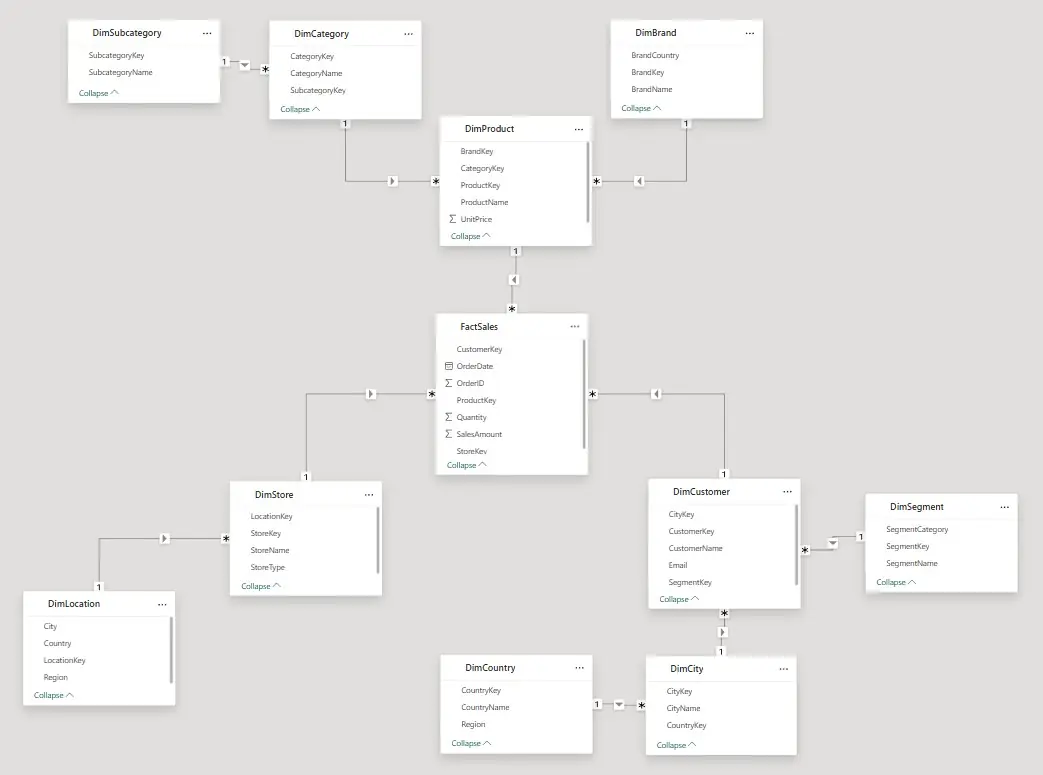
Dimensions branch into extra layers. Customers link to cities, cities to countries, products to categories, and so on; creating longer chains of joins for Power BI to navigate.
Instead of having all product attributes in one table, details like store, product, and customer are split out into different lookup tables.
This design is common in large data warehouses, where storage savings and strict data governance are priorities.
Where snowflakes cause problems in Power BI
- Slower performance – VertiPaq must hop through several tables to apply a single filter.
- Harder to understand – Users often struggle to follow multi-level lookups.
- More fragile – Changes in one table require updates across several others.
- Trickier DAX – Multi-hop relationships make filter behaviour less predictable.
Snowflakes aren’t wrong. They’re just not what Power BI performs best with.
Why Star Schemas Outperform Snowflakes (VertiPaq Basics)
VertiPaq is how Power BI stores it’s data, and controls how you access it!
It stores data in compressed columns and only loads the columns needed for a query. Star schemas line up perfectly with how VertiPaq is designed:
- Dimension tables compress better because repeated values (e.g., ProductCategory) shrink well.
- Fact tables remain dense and efficient when dimensions are flattened.
- Fewer relationships reduce the work required for filter propagation.
- Lower cardinality improves indexing and speeds up grouping and filtering.
Snowflake schemas do the opposite: they increase cardinality, add extra joins, and create more relationships for VertiPaq to manage.
Trainer Insight: When reports feel slow or visuals behave inconsistently, the fix is often simpler than people expect.
In consulting sessions, we regularly see models improve dramatically just by restructuring them into a clean star schema.
Without changing any visuals or measures, performance improves, and the whole model becomes easier to work with.
Check out our guide on the 10 Star Schema mistakes everyone makes to set them up correctly!
In consulting sessions, we regularly see models improve dramatically just by restructuring them into a clean star schema.
Without changing any visuals or measures, performance improves, and the whole model becomes easier to work with.
Check out our guide on the 10 Star Schema mistakes everyone makes to set them up correctly!

When You Should Choose a Star Schema
In most Power BI projects, a star schema should be your default choice. It works best for:
- KPI dashboards that need quick visual interactions
- Self-service analytics, where users explore the model on their own
- Time intelligence (YoY, period-to-date, moving averages)
- General reporting such as sales, finance, HR, operations, inventory
- Simpler long-term maintenance
If you’re unsure which approach to use, choose a star schema.
When a Snowflake Schema Makes Sense
You’ll rarely build a snowflake schema directly in Power BI, but it can make sense when:
- You’re working with a large enterprise warehouse where normalisation is required
- Data governance outweighs performance considerations
- Power BI is simply the front end for a model built upstream (e.g., SSAS, Databricks SQL)
- You have very wide dimensions that genuinely save space when split
Even then, many teams still flatten the structure in Power Query because the performance benefits are hard to ignore.
Final Recommendation
Power BI is built around the star schema. It’s faster, cleaner, easier to maintain, and far more intuitive for users.
Snowflake schemas work well in upstream systems, but inside Power BI they introduce unnecessary joins and slower performance.
If your data arrives in a snowflake structure, flatten the dimensions in Power Query before loading the model.
You’ll end up with a faster model, clearer DAX, and reports that behave exactly as you expect.
Start with a star schema and only move away from it if you have a very specific reason.
Your reports will be faster, your modelling will be simpler, and your future self will thank you.

- Facebook: https://www.facebook.com/profile.php?id=100066814899655
- X (Twitter): https://twitter.com/AcuityTraining
- LinkedIn: https://www.linkedin.com/company/acuity-training/