
Acuity Training - London Training Courses

- Acuity Training, 44 Southampton Buildings, Holborn, London WC2A 1AP
- info@acuitytraining.co.uk
- 0203 603 0150
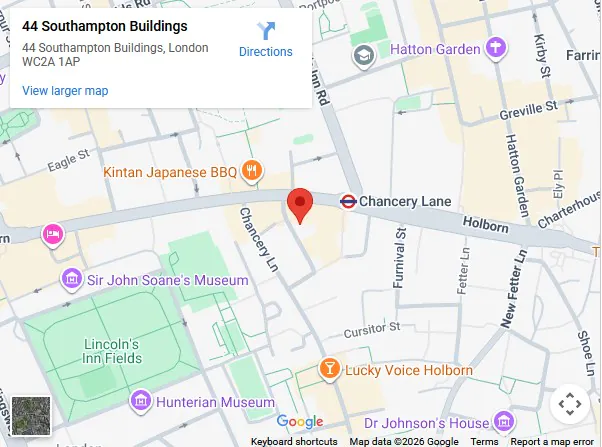
How To Get To Our London Centre
Our London training centre is at 44 Southampton Buildings, London WC2A 1AP, in Holborn, just off Chancery Lane, about a minute’s walk from Chancery Lane station on the Central line.
Our opening hours are 8am to 6pm Monday to Friday. Please contact us and make an appointment if you are not booked onto a training course.
Here’s a quick table that shows you how to get to Acuity Training from all the big stations in the city.
| Station | Time | How To Get Here |
|---|---|---|
| Chancery Lane | 2 min | Walk |
| Holborn | 7 mins | Walk |
| Farringdon | 8 mins | Walk |
| Bank / Monument | 8 mins | Central line, 2 stops |
| Liverpool Street | 12 mins | Central line, 3 stops |
| King’s Cross St Pancras | 13 mins | Central line to Holborn + walk, or direct bus |
| London Bridge | 15 mins | Northern line to Bank + Central line |
| Euston | 17 mins | Northern line to Bank + Central line |
| Waterloo | 18 mins | Jubilee to London Bridge + Central line |
| Victoria | 20 mins | Circle line to Farringdon + 8-min walk |
| Marylebone | 22 mins | Bakerloo to Oxford Circus + Central line |
| Canary Wharf | 25 mins | Jubilee to Bond Street + Central line |
| Paddington | 25 mins | Circle line to Farringdon + 8-min walk |
Unfortunately we do not have parking at our London office. Paid parking is available nearby however.
The Plus code for our address is: GV9P+5X London
Training Courses Run At Our London Centre
We run a regular schedule of open courses in London.
All of our London courses are backed by our money-back guarantee and include 6 months support as you would expect from a company that has been rated exceptional for 14 years by Feefo and been a Microsoft Partner for 20 years.
Excel Courses (Click For Full Details):
We offer a full range of Microsoft Excel courses from beginners’ courses through to Excel VBA and Power Tools courses.
Power BI Courses (Click For Full Details):
We offer a number of different Power BI and DAX courses ranging from introduction training for beginners through to advanced DAX for professional data analysts. We also offer bespoke corporate training which can look at the most advanced data modelling and data storytelling.
Microsoft Project Courses (Click For Full Details):
We offer 2 levels of Microsoft Project training and beginners introduction course and a more advanced courses for experienced users.
SharePoint Training (Click For Full Details):
Our 3 SharePoint courses cover a full curriculum from introductory training for people who have never used SharePoint through to Administrator training for people who will be setting up and administering SharePoint sites for others.
SQL Courses (Click For Full Details):
Our 2 SQL courses will take you from a beginner to being a confident advanced SQL user.
Line Manager Training (Click For Full Details):
Our one day intensive line manager course is designed to accelerate new line manager’s learning and equip them with the tools they need to hit the ground running in a new role.
Presentation Skills Training (Click For Full Details):
Our intensive presentation skills training course is one day.
Training At Your Locations Across London
As well as our Holborn centre, we can deliver training right next to your offices across London. We work with a number of professional venue partners to offer training at convenient locations across the city.
| Location | Nearest Station |
|---|---|
| Liverpool Street, 36 New Broad St, EC2M 1NH | Liverpool Street |
| Westminster, 52 Grosvenor Gardens, SW1W 0AU | Victoria |
| Marylebone, 25 N Row, W1K 6DJ | Marble Arch |
| Enfield, Innova Business Park, EN3 7GD | Turkey Street |
| Twickenham, 70 London Road, TW1 3QS | Twickenham |
| Croydon, 2 Lansdowne Rd, CR9 2ER | East Croydon |
| Barking, 160 London Rd, IG11 8BB | Barking |
If you can’t see anywhere convenient here, please contact us as other venues are available including:
London Bridge, Shepherd’s Bush, Hammersmith, Islington, Elephant & Castle, Chiswick, Battersea & Whitechapel
- Facebook: https://www.facebook.com/profile.php?id=100066814899655
- X (Twitter): https://twitter.com/AcuityTraining
- LinkedIn: https://www.linkedin.com/company/acuity-training/