

The Excel Skills Not Worth Learning Anymore (And The Three That Got More Valuable!)
Excel was first released in 1985. That’s over 30 years of updates, improvements and functions.
On top of that, Microsoft often does not remove features, it just adds new ones on top of them, so needless to say a lot of what’s there is not worth learning!
But the question at hand here is not just whether an Excel function is outdated. The question is whether you will ever need to write it again, or only to read it in a workbook somebody hands you.
Almost every article on this subject collapses those two things into one instruction: stop using VLOOKUP, use XLOOKUP.
That advice is correct about the writing but wrong about the learning. VLOOKUP appears in a large share of the workbooks arriving in our training room, written by someone who left the organisation years ago.
A delegate who was told not to learn it cannot maintain the file they were given.
So instead of seeing things as outdated and not worth your time, apply the read/write test instead.
| Skill | Learn to write it? | Learn to read it? |
|---|---|---|
| VLOOKUP / HLOOKUP | No | Yes – unavoidable |
| INDEX + MATCH | No | Yes |
| Nested IF beyond two levels | No | Yes |
| CONCATENATE | No | Yes |
| Ctrl+Shift+Enter array formulas | No | Yes |
| LEFT / MID / FIND / LEN text-splitting stacks | No | Yes |
| Formula-based monthly data cleaning | No | No – use Power Query |
| VBA for routine data reshaping | No | Rarely |
| Memorising the function list and shortcut sheets | No | No |
Skills To Stop Writing But Keep Reading
A lot of what is available in Excel these days is simply not efficient.
Microsoft keeps things in Excel around so people aren’t forced to change, but there are better and smarter ways to approach it.
VLOOKUP and HLOOKUP
XLOOKUP searches in any direction, defaults to exact match, survives inserted columns, and handles a missing value without a wrapper function.
You should learn how to read VLOOKUP and HLOOKUP, but only write XLOOKUP.
INDEX and MATCH
INDEX and MATCH originally solved VLOOKUP’s left-lookup problem for a generation of analysts, but XLOOKUP does the same thing in one function with clearer arguments.
Experienced modellers still disagree about this, on the grounds that INDEX and MATCH separate the position lookup from the retrieval and are therefore easier to audit in large models.
Nested IF Beyond Two Level
IFS handles sequential conditions. SWITCH handles exact matches against a list.
A two-column lookup table plus XLOOKUP handles anything with more than five branches, and has the advantage that a non-Excel colleague can read the rules without opening a formula.
CONCATENATE
The ampersand operator joins two items. TEXTJOIN joins a range with a delimiter and skips blanks, which is the behaviour people wanted from CONCATENATE and never got.
Microsoft retains CONCATENATE for backwards compatibility only.
Skills That No Longer Justify The Classroom Time
These skills aren’t just simple swaps, the task itself should just move somewhere else.
Cleaning Data With Formulas Monthly
Helper columns of TRIM, PROPER, LEFT and SUBSTITUTE rebuilt every reporting cycle is the single most common waste of skilled time we see.
Power Query records the transformation once and reruns it on refresh.
The delegates who benefit most from this are the ones who had become genuinely good at the formula approach, which is what makes it a difficult recommendation to hear.
VBA For Routine Data Reshaping
Merging files, unpivoting, splitting columns and appending tables no longer need code.
VBA retains a real case for user forms, event-driven behaviour, and automation that crosses application boundaries.
Our Excel Power Tools course exists precisely because the reshaping half of that workload moved, and delegates who arrive planning just to learn macros for it usually leave planning something else.
Memorising Functions And Shortcut Lists
Excel has over 500 functions. Published shortcut references run past 200 entries.
Recall of the list stopped being as relevant once when the formula bar started auto completing, and then again when Copilot started being able to draft syntax on request.
Recognising which category of tool a problem needs is now the skill; the exact argument order is lookup-able and always was.
Why “Just Switch” Fails In Most Organisations
The swap advice assumes everyone is on a current version. Large employers are frequently not.
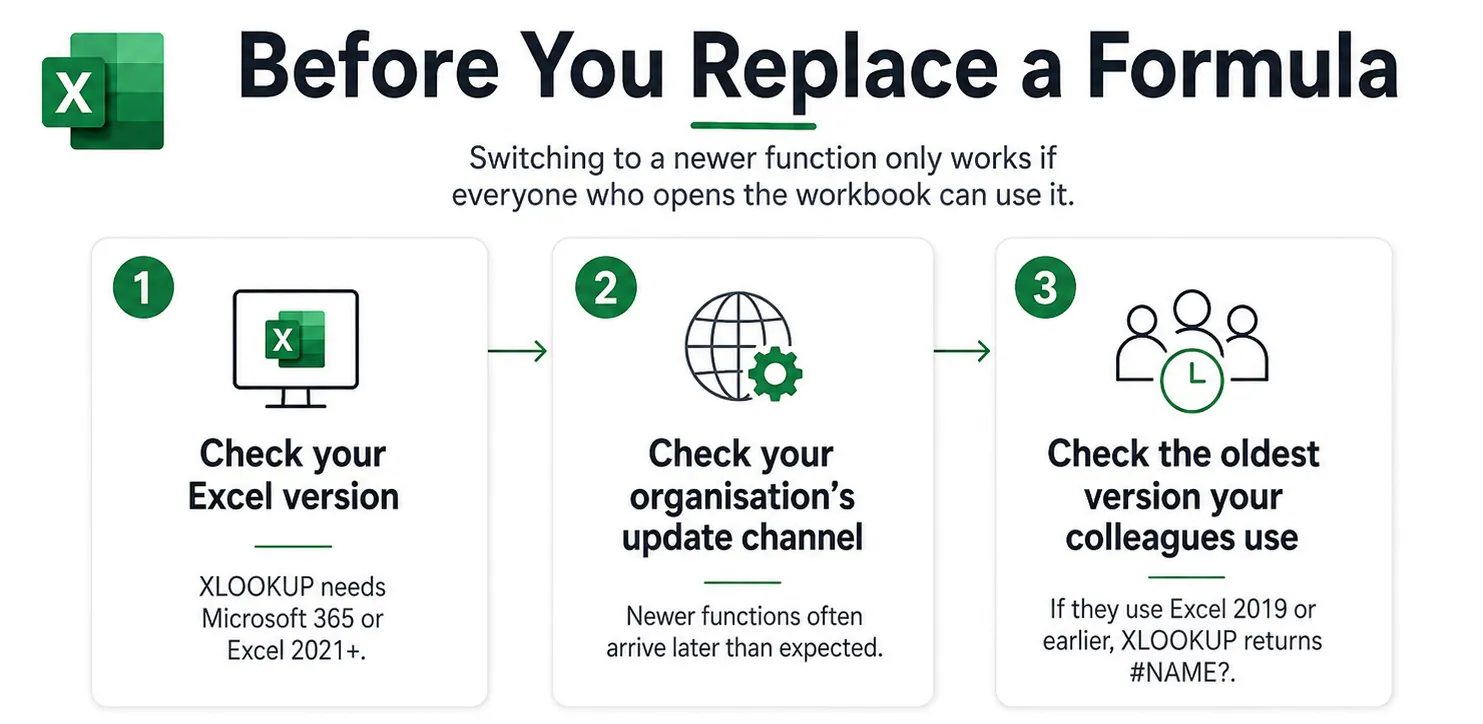
XLOOKUP requires Microsoft 365 or Excel 2021 and later. In Excel 2019 and earlier it returns a #NAME? error, so a workbook built with it will just break for colleagues on older builds.
Update channel adds a second delay on top of version. A reader of that same outdated-functions article explained that his large employer’s Microsoft update channel meant the newer functions would not reach him for some time, and that he was learning them in advance of availability (My Online Training Hub, May 2025).
A year after that article was published, another reader asked how to enable TEXTAFTER and TEXTBEFORE, having found the other functions present but not those two. The answer was that functions cannot be enabled – the version either includes them or it does not.
Both readers were doing exactly what the article recommended. Neither could act on it. Establish these three things before rewriting a single formula:
1 – Your Excel version
2 – Your organisation’s update channel,
3 – The oldest version in use among the people who open your files.
The Three Skills That Became More Valuable
Auditing a formula you did not write. Copilot in Excel now produces formulas on request, which shifts the scarce skill from composition to verification.
To us, AI actually raises the value of advanced Excel knowledge rather than lowering it, because deconstructing a generated solution to confirm it does what you intended requires understanding you cannot delegate.
Structuring source data as an Excel Table. Tables are the precondition for most of what replaced the skills above. Structured references remove the need for OFFSET and INDIRECT.
Power Query, PivotTables and dynamic arrays all behave predictably against a table and unpredictably against a formatted range with merged cells and a title row. Copilot in Excel produces markedly better results against tabular data for the same reason.
Absolute and relative references. Unchanged since 1985, still the most frequent cause of a model that returns the wrong number without any error message.
No newer function removes the need to understand it, and no AI tool reliably catches it, because a mis-anchored reference produces a plausible answer rather than an error.
How We Keep Our Training Relevant
We run Excel training courses in Holborn every week, so it’s our job to make sure what we teach is up to date and relevant.
Our trainers are Excel pros (like Lucinda who brings over 20 years of experience!) that use the software day in and day out, and help craft our syllabus around what people actually bring into the room.
Delegates who arrive asking which functions to memorise leave with a different approach in hand, one that isn’t just formula based.
We encourage people to think about what their problems are, and teach them how to build a plan to solve them using a variety of tools.
A monthly report is rarely just a formula problem. They have issues with their data, structure, presentation and formulas.
That’s why we teach our delegates not just the most efficient formulas, but the entire approach they should take to Excel.

- Facebook: https://www.facebook.com/profile.php?id=100066814899655
- X (Twitter): https://twitter.com/AcuityTraining
- LinkedIn: https://www.linkedin.com/company/acuity-training/