

How Copilot Is Actually Used at Work: Finance
Contents
When you look at AI in the workplace, you often just get a list of impressive sounding features.
Google Copilot for example, and you’ll see it can summarise documents, draft emails, analyse spreadsheets and generate reports. Sounds great, but what does that actually look it?
Where Copilot really becomes valuable is when you implement it into your existing workflows – like financial reporting, HR documentation, operational processes and sales activity.
It doesn’t replace your role or expertise, like some people keep saying. But it accelerates the parts of your work that are repetitive or documentation heavy, freeing you up to work on more important tasks!
So let’s take a look at how Copilot is actually in Finance.
Copilot in Finance Workflows
Finance teams are typically very well-structured, and tend to be more process driven – which makes them a great environment for Copilot.
Their work follows repeatable workflows and standardised outputs.
- Budgeting with consistent templates
- Forecasting with defined models
- Reports with formatted structures and narrative styles
- Audit trails and supporting documentation in a consistent location
These process create huge amounts of data, commentary and documentation, which is why Copilot is such a great fit!
Scenario 1: Month-End Variance Reporting
Say you have some raw financial data, housed in Excel.
Here I’m going to use a small and simple dataset, but the key here is that Copilot and Excel will scale up and work with any datasets.
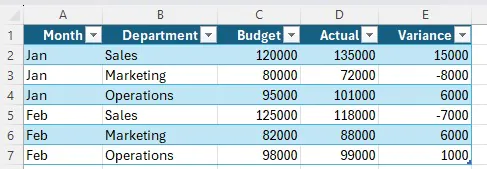
And you need to explain it every month for a report sent to your supervisor.
Simply open up Copilot, attach your spreadsheet, and write this prompt:
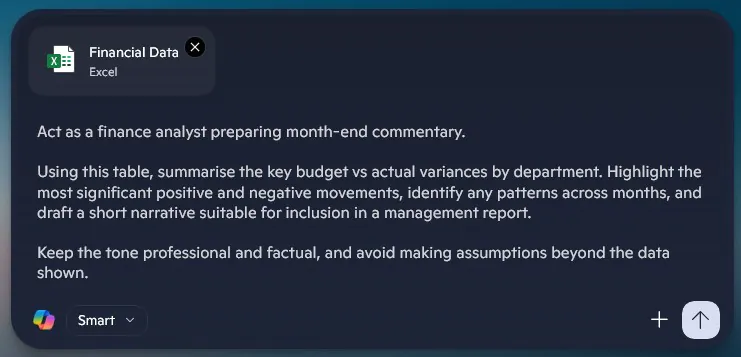
Now, the prompt is a very important part. AI will always do what you tell it, so the more information and context you can provide, the better.
This is where Finance is such a great fit, if you have a set of guidelines for reporting, you can just upload them and Copilot will format everything for you!
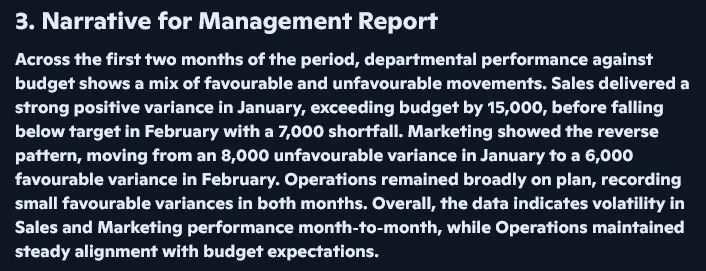
You’ll immediately get a structured summary of movements, trends across months, and a first draft of your report. For a pro tip from our Copilot courses, one of AI’s best uses is to generate a first draft, it’s much easier to work from this output than to look at a set of data and a blank Word document.
A better way to think about Copilot in finance isn’t centred around automation, but a faster first-pass review. In practice, it majorly cuts down on time spent getting to a usable draft, bringing up possible issues or preparing an explanation. The finance team still owns the important part of the process: what needs escalation, and what should be signed off.
Scenario 2: Drafting Budget Narratives
A big part of finance isn’t just data – it’s the story that it tells.
Budgets, forecasts and cost plans need a written explanation. Why are we spending more? Where are our investments going? What risks should leadership be aware of?
This narrative work can often take longer than the actual calculations, finance pros need to translate huge sets of data into something simple and actionable.
Once a budget model has been built into Excel, Copilot can start drafting your narrative for you.
Imagine you have a budget, and you need to present it at a meeting – explaining investment patterns, key cost drivers, and any notable changes across the quarter.
This time, our data set is a little more complex, so download it here if you want to follow along.
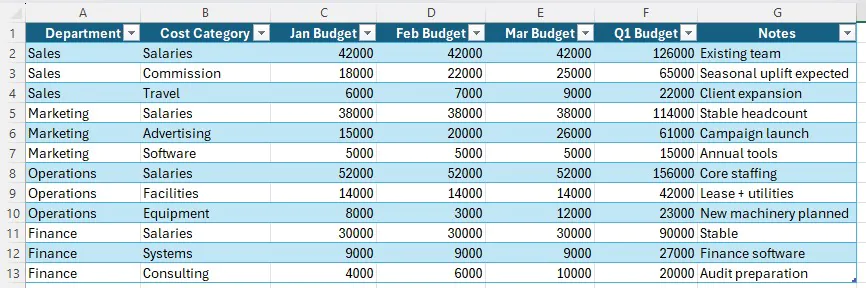
From here, again drop your file into Excel – and use this prompt this time:
“You are supporting the preparation of a leadership budget presentation.
Analyse this departmental budget and produce a short narrative explaining the main cost drivers, areas of investment, and potential pressure points. Emphasise trends across the quarter and highlight anything that leadership may need to monitor.
Keep the tone concise, factual, and appropriate for a senior management audience.”
For more on effective prompting, see our Copilot starter guide.
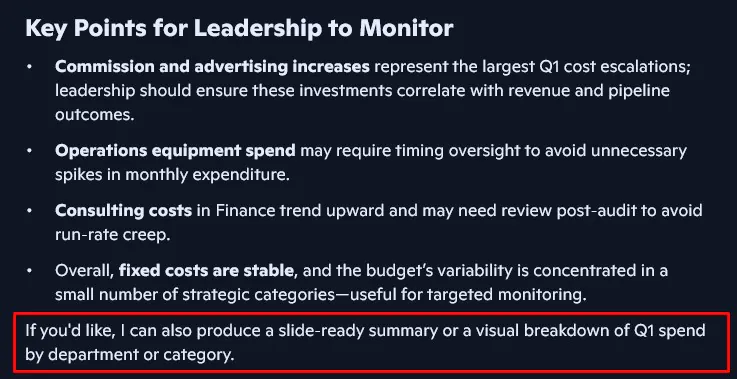
You’ll get a great output, and notice that Copilot even starts bringing up great suggestions for what might help present this. Following along with the visual, we get this great chart:
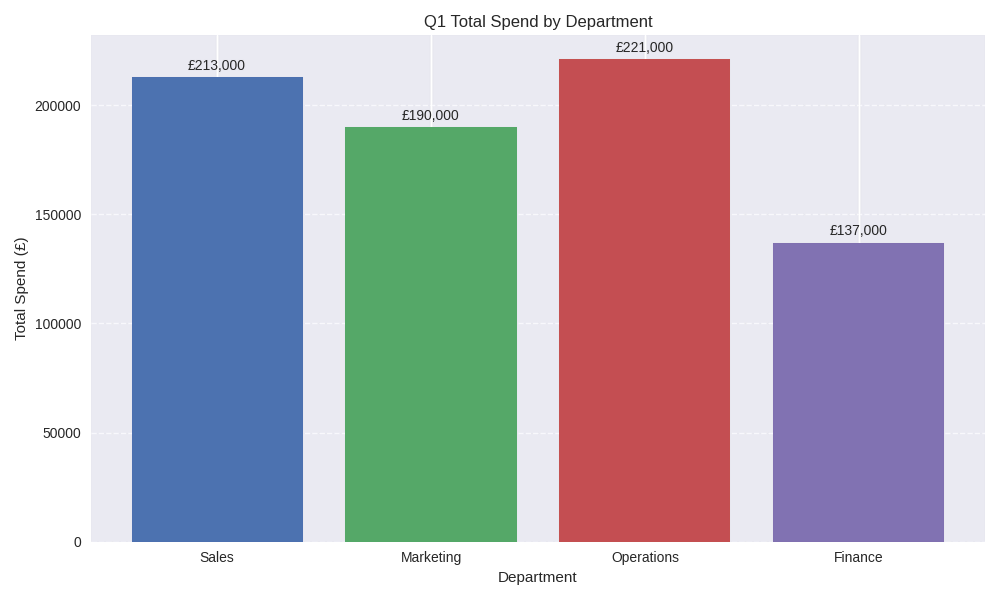
So not only are you getting help telling your story, Copilot is even building the supporting visuals for you!
💡 Trainer Insight
A common misconception we see as trainers is that Copilot replaces financial judgement.
In reality, it handles the translation layer. Turning numbers into a readable narrative.
The finance professional still decides what matters, what’s a risk, and what leadership needs to know.
The tool speeds up the process, but the expertise remains human.
Important Note: AI is a great starting point, but it is not perfect! Please make sure you check through the output, and ensure everything is accurate. Never make something in Copilot and send it somewhere else without being sure!
Scenario 3: Identifying Patterns
As humans, we love finding patterns – and since AI was built off human behaviour, it does too!
We’ve already been through examples on how it can speed up your reporting and presenting – so how does Copilot do when supporting actual thinking?
Going back to Finance, you’ll spend a lot of time digging through data, trying to find things that don’t make sense and what might be causing them.
Here we’ll work with some transaction data.
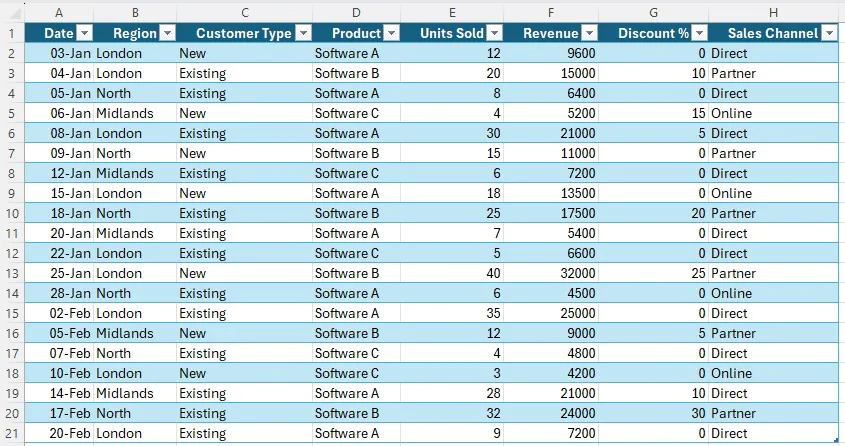
And use this prompt:
“Act as a commercial finance analyst reviewing transaction-level revenue data. Identify any unusual patterns, spikes, or inconsistencies across regions, products, customer types, or discount levels that may require further investigation. Focus only on observations supported by the data.”
Copilot will produce a long, detailed output for you, as well as a summary of points you might want to look into.
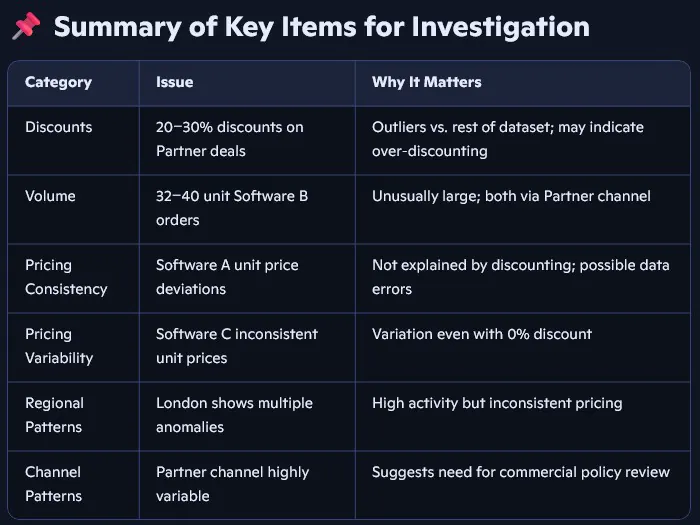
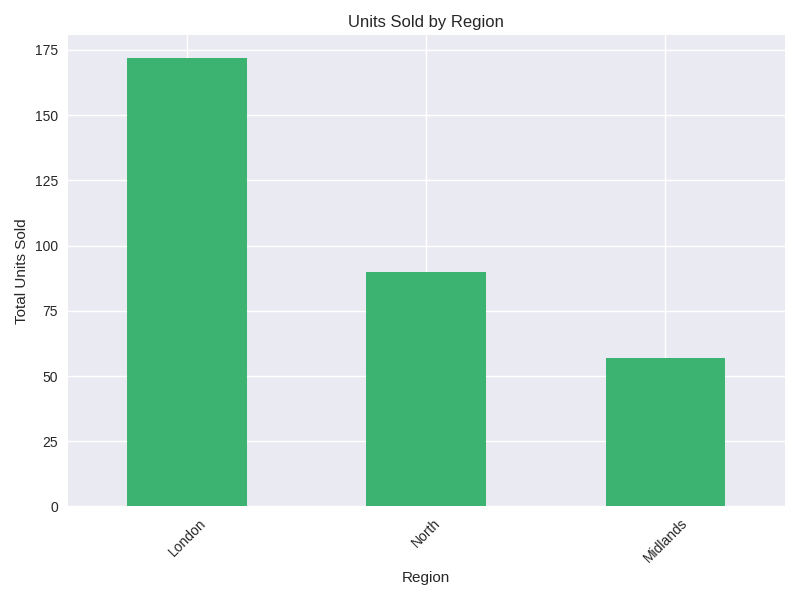
Going one step further, we can ask it to “Produce a visual anomaly dashboard” and it will visualise the abnormal data for you.
Conclusion – Why Is Copilot So Valuable In Finance?
Finance is one of the few areas where structure, repetition, and accountability are already baked in to every workflow.
Reporting cycles repeat each month, documentation follows consistent formats, and outputs are always clear, traceable, and explained.
For Copilot, that environment is ideal – and it reduces all the friction around your tasks.
Instead of starting with a blank document, you can work off an existing draft – all formatted perfectly. Writing commentary, preparing summaries, and even just wondering where to start analysis all become so much smoother with Copilot.
The impact isn’t dramatic or immediate, but across a few weeks, the time saved adds up quickly.
- Facebook: https://www.facebook.com/profile.php?id=100066814899655
- X (Twitter): https://twitter.com/AcuityTraining
- LinkedIn: https://www.linkedin.com/company/acuity-training/