

Handling Complex Logic Like a Pro in Excel – Helper Columns
Contents
When we think about Excel pros, what do we think of?
Complicated spreadsheets and complex formulas.
But in a professional environment, it’s often the complete opposite. The best spreadsheets rely on clear logic being broken down piece by piece.
This is something we constantly see on our Excel courses. Workbooks don’t become fragile because formulas are wrong – they become fragile because long and complicated formulas are used when there was a better tool lying right there.
So let’s have a look at those spots where formulas are not the best solution – and what a pro would do instead.
TL;DR
Excel pros do not build mega formulas. They
- Break logic into steps
- Use helper columns to make thinking visible
- Test calculations piece by piece
- Build spreadsheets others can follow and trust
Helper columns don’t make your work less advanced, they make it professional.
Complex Logic In Excel
One of the most obvious signs of a fragile workbook that we see on our City of London Excel training is what we call the “mega formula”.
It’s a formula that contains nested IF statements, multiple lookups and long expressions. Most of the time, only the writer understands it.
While they do technically get the job done, they are difficult to:
- Maintain
- Explain
- Debug
- Trust
And professional Excel is all about clarity. When your spreadsheet is being used to make decisions for the business, you can’t compromise on the cleanliness of your work.
Instead of compressing all your process into one formula, you should break the logic into steps, use helper columns, and make transformations visible.
Take a look at this data set:
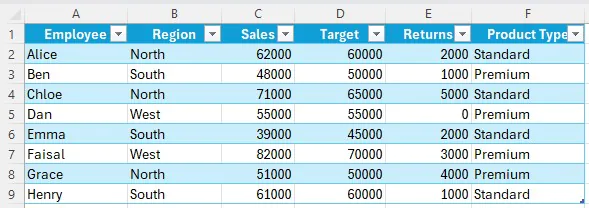
And imagine a company is paying commissions to their sales staff. The commission isn’t just a flat percentage, it’s dependent on their sales performance, and some region-based commission rates.
Each region has its own rate: North → 5%, South → 4%, West → 6%. Once we know someone’s adjust sales, we will multiply it by the correct regional rate.
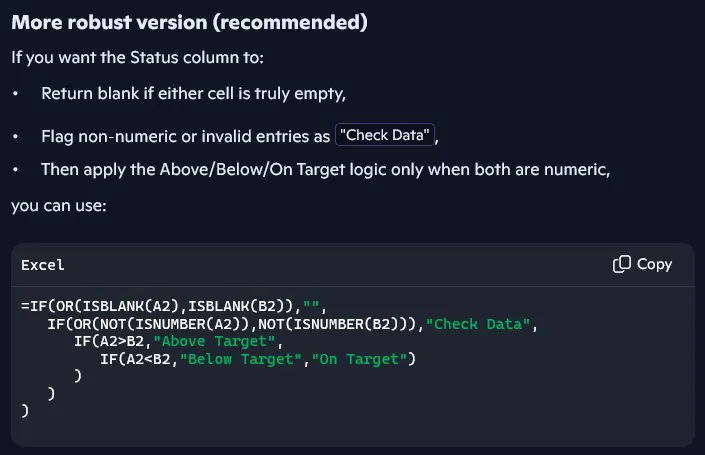
The mega formula is going to look something like this:

We have nested IF statements, and at a glance it’s very confusing.
It is working, but it’s messy, and it definitely won’t scale well. When it comes time to start introducing new regions or changing rates – everything will break.
The Pro Approach: Breaking The Logic Into Steps
Instead of the mega formula, a pro is going to build a model using helper columns.
It’s not that they can’t write this formula, it’s that they are building for their team – not themselves.
With our example, we’d add two new columns: Adjusted Sales and Final Commission, and a new table, Commission Rate.

With thee helper columns, each just has one simple calculation within them, and explains itself.
We can easily add new regions in to the Commission Rate table, so our solution is scalable!
Why This Instantly Improves The Workbook
It Becomes Readable
It might seem simple, but it’s honestly something we keep seeing, people do not pay attention to readability!
With this solution, someone that opens the file can follow the logic immediately. They know what you did, where, and why.
They don’t have to click around and interpret a long formula. They can see the process.
It Becomes Testable
If the commission looks wrong, you don’t have to start digging through each individual formula.
You can check if the adjusted sales are correct and the commission table is correct.
This lets you isolate the issue within seconds!
It Becomes Maintainable
Commission structures are going to change over time! We might want to add new regions, adjust the existing percentages, and just set different rules.
With a mega formula, every change is going to make you rewrite the underlying logic.
Using helper columns, you only have to tweak one step, and everything else stays intact.
It Becomes Trustworthy
A real step in the process will be someone auditing your formulas, so make it as easy as possible for them.
If spreadsheets are influencing how much money gets spent – it’s a big deal.
People need to have real faith in the numbers, and trust they are being built with a good foundation.
Helper columns make the logic transparent. Without them, nobody is going to make decisions based on your data!

Conclusion
Handling complex logic in Excel isn’t about squeezing everything you have into one impressive looking formula.
It’s about building spreadsheets that really make sense. To you, and to your colleagues, and especially to anyone who is making decisions from the output.
Helper columns turn hidden thinking into visible steps. Your logic becomes easier to follow, test and maintain.
That’s the difference between a pro and someone who thinks they know what they are doing.
- Facebook: https://www.facebook.com/profile.php?id=100066814899655
- X (Twitter): https://twitter.com/AcuityTraining
- LinkedIn: https://www.linkedin.com/company/acuity-training/