

InDesign: Controlling Margins [Master Guide]
Presenting your document so that it is very clear and easy for a reader to navigate is critical.
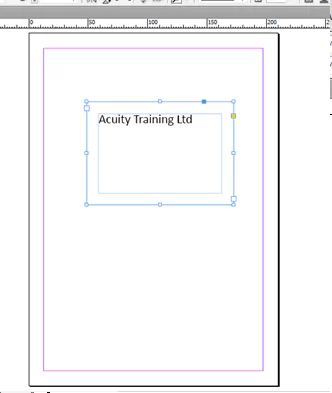
Adding a margin to the inside of a framed box will make sure that the contents of the box really stand out and catch the readers eye.
Learn these types of simple presentational techniques are covered during our introductory InDesign Courses.
Select the text box with the Selection Tool (black arrow tool)
From the Object Menu, select Text Frame Options.
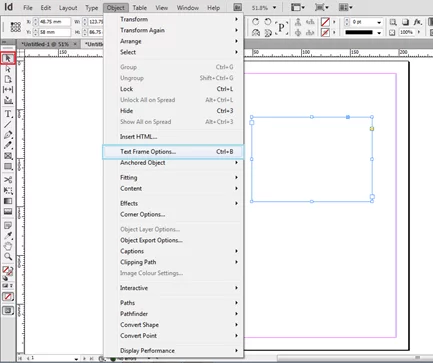
Set the four Inset Spacing values to the desired amount.
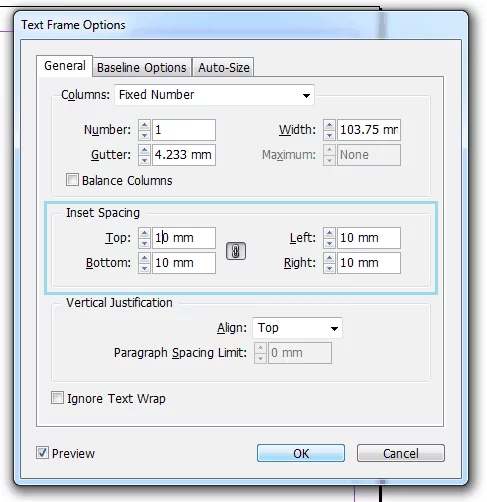
Select Preview to see the results.
Want a another quick fire InDesign article? check out indesign enter column break instruction or Using Spell check in InDesign or a guide to using tables in InDesign.

- Facebook: https://www.facebook.com/profile.php?id=100066814899655
- X (Twitter): https://twitter.com/AcuityTraining
- LinkedIn: https://www.linkedin.com/company/acuity-training/