

How To Think With Copilot
Contents
We’ve been teaching Copilot ever since it first released to the public, and this is the most important thing we teach:
How do you actually approach your work with Copilot in mind?
Most people who struggle with Microsoft Copilot aren’t struggling because the tool is bad. They’re struggling because they’re approaching it with the wrong mental model – and no one ever explained what the right one looks like.
Getting Copilot to work well for you isn’t mainly about writing better prompts. It starts one step earlier than that: developing a new instinct for how you approach your work, and recognising where Copilot fits into it.
Once that clicks, the prompting side tends to fall into place.
Don’t Think About Copilot As A Search Engine
The most common mistake we see in Copilot training rooms is people treating Copilot like a smarter version of Google.
They type a short phrase, get a generic response, and conclude the tool isn’t particularly useful. The problem isn’t the tool – it’s the input.
When you search Google, a short query works because search engines are built to match your words to existing web pages. Copilot isn’t retrieving pages. It’s constructing a response, from scratch, based solely on what you give it.
The less you give it, the more it has to guess – and its guesses won’t reflect your audience, your tone, your context, or the specific outcome you need.
The mental shift here is significant. With Copilot, you are the one with the expertise. Copilot is the one with the capacity. Your job is to brief it well enough that its capacity produces something useful to you.
Think of It as Briefing a Capable Colleague
Here’s a really useful model you can use: imagine Copilot is a highly capable junior colleague who has just joined your team.
They’re intelligent, fast, and willing to tackle almost anything you put in front of them. But they don’t know your clients, your organisation’s preferred tone, the background to this particular project, or what “good” looks like in your context.
If you walk over to that colleague and say “write me something about the Q3 results,” you’ll get back something technically competent but generic and unfocused.
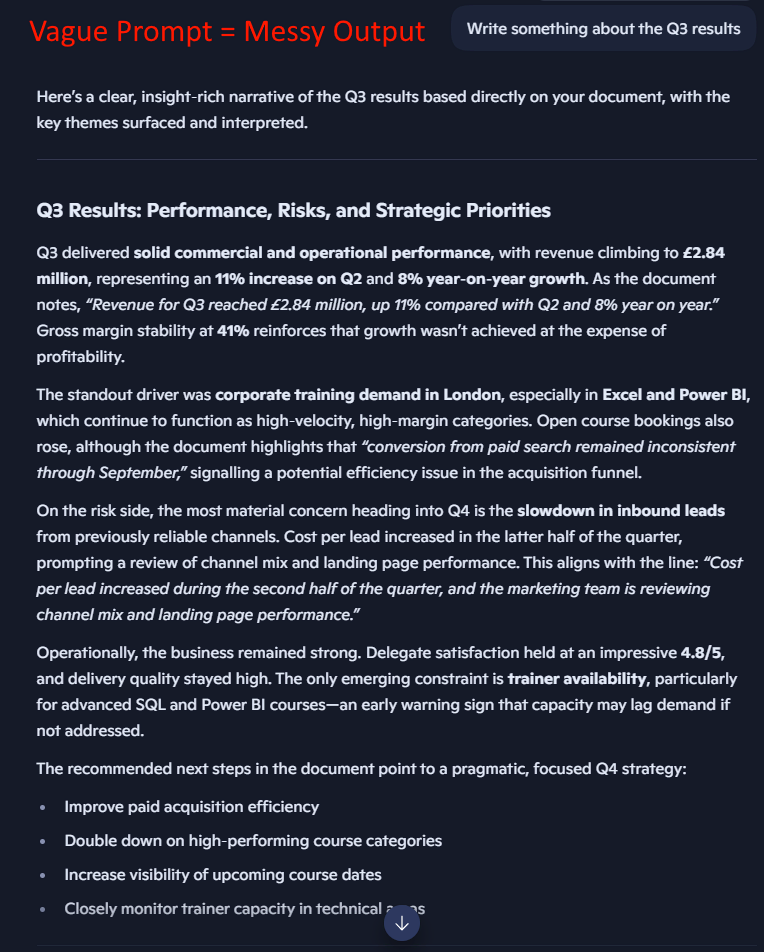
If you said “write a two-paragraph summary of the Q3 results for our MD – she wants the headline numbers and the main risk, written in plain English, no jargon” – you’ll get something much closer to what you actually need.
This is the core shift: Copilot doesn’t need you to be a better typist. It needs you to be a better briefer.
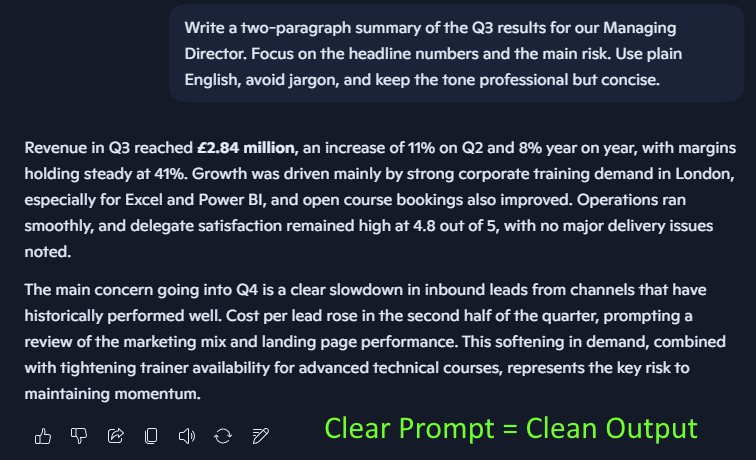
That means thinking about four things before you type anything:
What is the task? Be specific about what you’re asking for – a summary, a first draft, a list of options, a reformatted version of something.
Who is the audience? Copilot will calibrate tone and complexity differently for a board report versus a Slack message to your team.
What context does it need? What’s the background to this task? What has already happened? What’s the purpose? Anything Copilot doesn’t know, it will make up or ignore.
What does a good output look like? Length, format, level of detail, tone – if you don’t specify, Copilot will choose for itself.
You don’t need to write out a paragraph on each of these every time. But running through them quickly before you type will transform the quality of what you get back.
Learning How To Spot Delegation Opportunities
One of the most valuable things Copilot training does is help people develop an eye for which parts of their working day are actually good candidates for AI support.
At the end of the day, not everything is. Copilot works best on tasks that are:
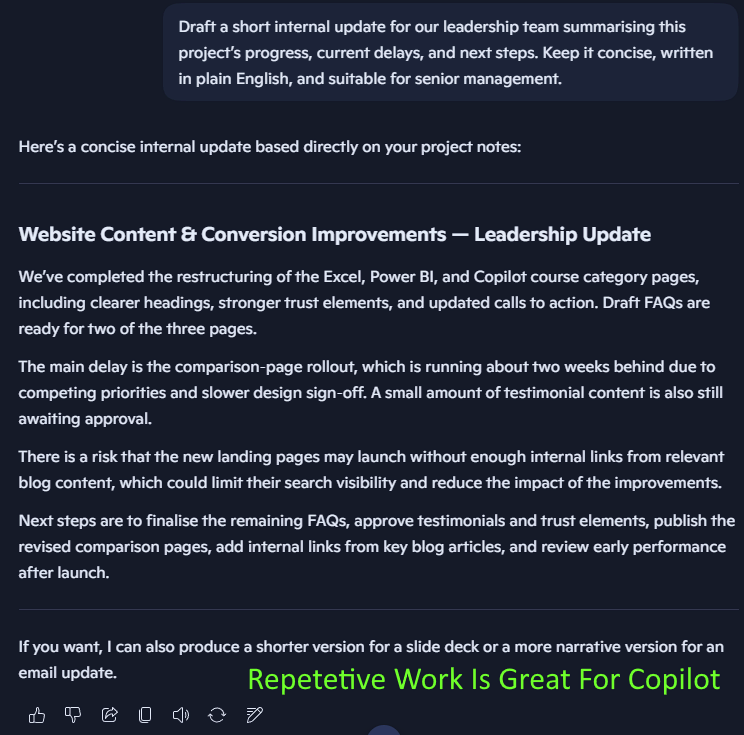
- Repetitive in structure, variable in content – things like meeting recaps, status updates, first drafts of similar documents, reformatting reports
- Time-consuming but not uniquely yours – summarising a long email thread, pulling action points from notes, creating a draft agenda
- Drafts, not decisions – generating a starting point that you’ll review, refine, and own
A great example is an internal update, where you can provide all the information and just need it summarised:
The tasks that are less suited to delegation are ones that require your specific judgment, relationships, or accountability.
Writing a performance review for someone on your team, for instance, needs your insight: Copilot can help you draft or polish the language, but it can’t supply the substance.
A useful exercise is to spend a week keeping a rough mental note of tasks that made you think “I wish someone else could do this first draft.”
Give It Context – Including Your Own
One of Copilot’s most powerful features, particularly in Microsoft 365, is its access to your work ecosystem – your emails, your Teams messages, your documents, your calendar.
This is what makes it different from a general-purpose AI chat tool. But this only works if you think to use it.
When you’re asking Copilot to help with a task, consider what context from your own work it could draw on. Instead of writing a long explanation of a project from scratch, you can reference the document or email thread that contains it.
Instead of summarising a meeting from your own notes, you can let Copilot work from the recorded transcript.
The principle here is the same as before: don’t give Copilot less to work with than it needs. The more relevant context you provide – either by describing it or by pointing to it – the less it has to guess, and the more tailored the output will be.
💡 Trainer Insight – When To Use Context
Pointing Copilot at existing files is great, but works best when the context is focused and relevant.
This usually looks like a single email thread, a specific document or a meeting transcript.
Documents like this give Copilot something concrete to work from.
An issue we see in our Training rooms, is that people try and build a prompt or process to use every time.
In reality, the best approach is to think carefully about the task and what will work best.
If your task is more open-ended or research based, then supplying supporting documents is only going to confuse it.
Aim For A Process – Not Perfection
A lot of new Copilot users have an unconscious expectation that the tool should produce a finished, ready-to-use output on the first attempt. When it doesn’t, they feel let down.
Experienced Copilot users think differently. They see the interaction as a process: a brief, a response, a critique, a refinement, and sometimes another round after that.
In practice, this is faster than trying to specify everything perfectly upfront – and it produces better results, because you refine based on what you see rather than trying to predict it.
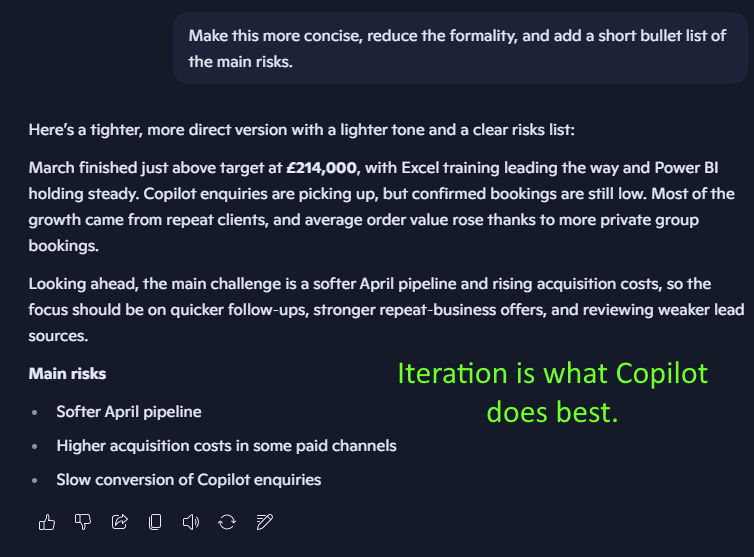
If you find yourself thinking “that’s not quite right” after a Copilot response, that’s not failure – that’s the process working. Tell it what’s not right and ask it to try again. That feedback loop is where Copilot earns its value.
When Not To Use Copilot
Developing the right relationship with Copilot also means knowing when it’s not the right tool to use.
Copilot can struggle with tasks that depend heavily on very specific internal knowledge it hasn’t been given, or where accuracy is critical and there’s no easy way for you to verify the output – financial figures, legal language, technical specifications.
It can also produce outputs that are plausible-sounding but incorrect, particularly when asked to recall specific facts or data.
The rule of thumb is: the higher the stakes of being wrong, the more important it is that you review carefully – or that you’re the one providing the substance, not asking Copilot to generate it.
Use it to structure, to draft, to refine, to summarise. Keep your own judgment firmly in the loop.
Conclusion
These habits aren’t complicated, but they do need some adjusting to. Most delegates on our courses find that after a few weeks of practice, the new way of thinking starts to feel natural. But it is going to need conscious effort!
The change isn’t really about Copilot. It’s about developing a clearer, more intentional way of thinking about how you work:
What tasks deserve your full attention, what can be efficiently delegated, and how to get real help from something that doesn’t already know everything you know.
Once you shift the way you approach it, Copilot becomes one of the best AI tools on the market.
- Facebook: https://www.facebook.com/profile.php?id=100066814899655
- X (Twitter): https://twitter.com/AcuityTraining
- LinkedIn: https://www.linkedin.com/company/acuity-training/