

Copilot vs ChatGPT – Which Should You Use at Work?
Contents
AI is an incredibly competitive market, with every tool trying to get your attention and business.
Copilot vs ChatGPT, which is better, which should you use?
But framing the argument like this misses the point and ends up making you hinge everything on one tool, instead of getting the most out of both.
Copilot and ChatGPT are not 1 to 1 tools, and if you treat them like they are then you’ll lose value either way.
The better question is really:
Where would each tool fit into each of your workflows?
Instead of endlessly listing features, let’s take a look at what you actually do on a day-to-day basis, and which tool serves each best.

Planning & Thinking Through Work
Before your work actually begins, in the planning phase, ChatGPT is going to shine brightest.
If you are:
- Structuring ideas
- Exploring approaches
- Solving problems on a conceptual level
- Trying to learn something new
Then ChatGPT works great as a thinking partner. It’s the best AI tool out there to point you in the right direction, and get you asking the right questions.
Compared to Copilot, it has a much more inquisitive tone, and tends to ask more questions – helping you brainstorm things and pin stray thoughts into solid ideas.
Copilot on the other hand works almost entirely off structure. It needs defined rules, clear boundaries, and just does what you tell it. You can’t just set it off on a research task like you can with ChatGPT.
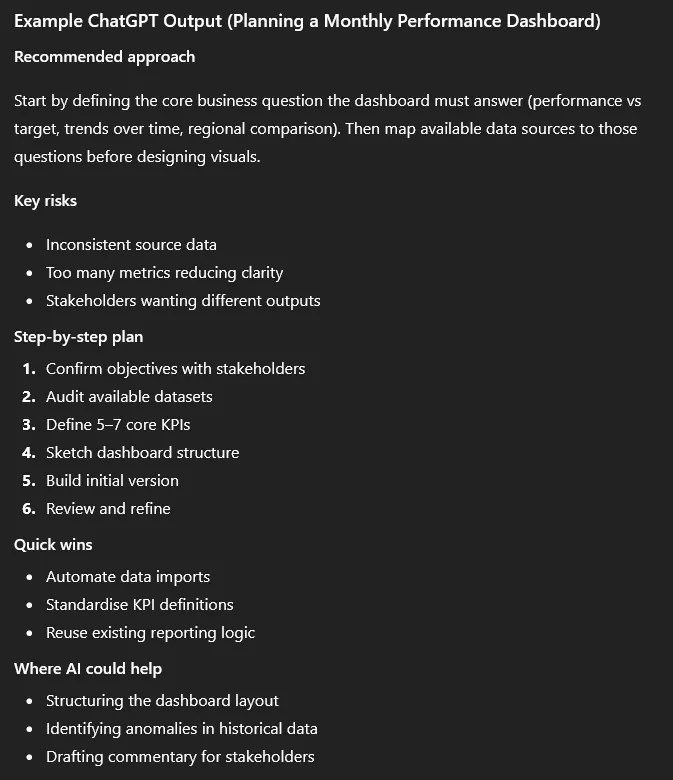
Project Planning Prompt (Copy & Use Yourself!)
If you want to get started with ChatGPT for planning, take this sophisticated prompt we built to get started.
“You are helping me plan a work project. Ask clarifying questions if anything is unclear, then help me structure the approach, goals, risks and next steps.
PROJECT TYPE: Fill this yourself, for example monthly reporting process, dashboard building, presentation design.
OBJECTIVE: Here outline the specifics of what you need to achieve
BUSINESS CONTEXT: Explain your industry, the department you work in and the situation at hand
DATA / INPUTS: What information, files and systems are involved
STAKEHOLDERS: Who will be involved or affected with this project
CONSTRAINTS: The time, resources, deadlines and technical limitations
From this, outline the best structured approach to delivering this project, identify risks / blind spots, suggest a logical step-by-step plan, highlight where automation or AI could help, and suggest how everything can be presented to stakeholders. Be practical and workplace-focused.”
And from this, you’ll get a comprehensive but concise output.
Executing And Finalising Work
Once the thinking is done and the work is actually in process, Copilot is typically your best choice.
It’s a simple question that we teach everyone to ask on our Copilot courses in London: am I planning or executing?
If things are no longer just conceptual and have become practical – Copilot is your best friend.
Instead of planning, you need to build, refine and deliver.
Most of these processes will happen where Copilot lives – in Excel, PowerPoint, Word, Outlook and Teams.
It’s a popular tool for a good reason, if you are:
- Cleaning and structuring data
- Building reports and formulas
- Summarising performance
- Drafting documentation
Then it works best, it was literally built for these tasks.
How To Prompt Copilot Effectively
A good Copilot prompt is very different at it’s core to ChatGPT. They need to sound like instructions, rather than guidance.
Good ChatGPT prompts = exploratory, open-ended, planning focused
Good Copilot prompts = direct, contextual, outcome focused
You need to give clear instructions, ask specific questions, and provide as much context as possible.
For example:
Excel – Preparing a Report for Stakeholders
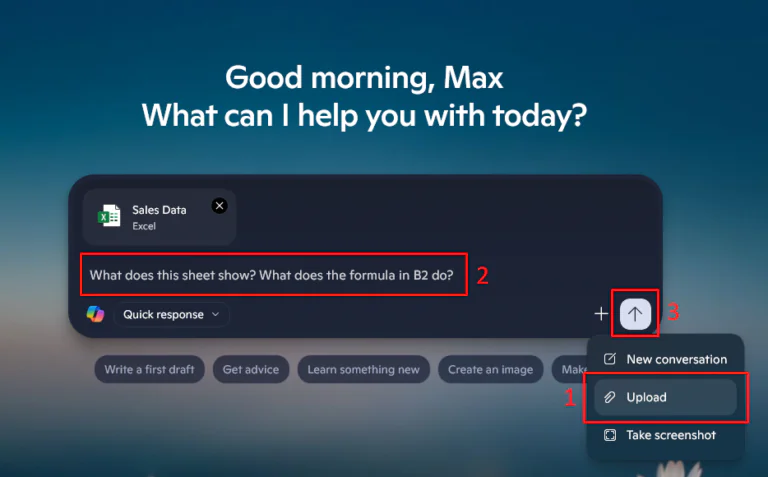
To use Copilot with Excel, just attach your sheet and use a prompt like this:
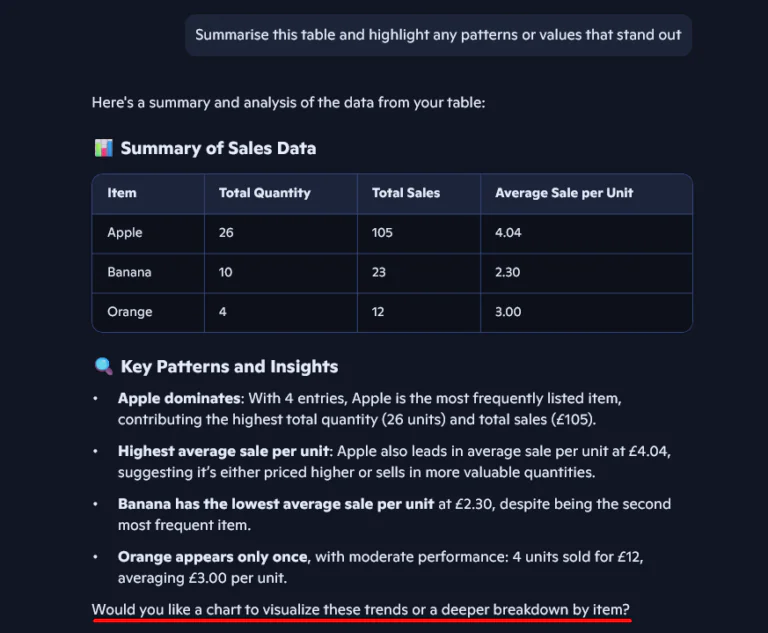
“Identify the most important metrics in this sheet and generate a short performance summary suitable for a monthly update. Focus on clarity, not technical detail.”
This bridges the gap between the numbers on your screen to real actionable insights.
PowerPoint – Finalising A Presentation
If you’re building a presentation, give Copilot a chance to improve it:
“Turn the content in this deck into a clear story. Improve the flow between slides, simplify the wording, and make it suitable for a senior leadership meeting.”
This will save you time by giving you a much more solid foundation to work from.
Outlook – Communicating Results
Maybe your work isn’t analytical, but everyone needs to email! Copilot and Outlook are a great combination that we really love.
“Draft a reply summarising the key outcome of this work, what it means, and any next steps. Keep the tone professional and confident.”
The real value in Copilot comes when you use it all over your work, and email correspondence always ends up taking ages!
If you give it the chance, Copilot can speed up your work, and your communication.
Quick Comparison: Copilot vs ChatGPT
So hopefully you can see by now, that instead of asking which tool is better, thinking about where you are in the workflow is the key.
As is often the case, a combination of the two tools works best.
If you are ever unsure, feel free to refer back to this table for a quick look!
| Stage of Work | ChatGPT | Copilot |
|---|---|---|
| Planning a project | ✔ Excellent | Limited |
| Brainstorming ideas | ✔ Excellent | Limited |
| Learning / exploring concepts | ✔ Excellent | Limited |
| Structuring a report or approach | ✔ Excellent | Supportive |
| Working inside Excel | Guidance | ✔ Excellent |
| Analysing real datasets | Conceptual support | ✔ Excellent |
| Drafting from existing documents | Manual context needed | ✔ Excellent |
| Summarising email threads | Possible but indirect | ✔ Excellent |
| Building presentations | Planning support | ✔ Excellent |
| Finalising and delivering work | Supportive | ✔ Excellent |
Conclusion
Copilot vs ChatGPT isn’t really a competition. Both work for different tasks.
ChatGPT is at its best when you are planning, learning and shaping your initial ideas.
If you’re a professional using Microsoft tools all the time, Copilot is quickly going to become your main AI assistant! But if you can implement ChatGPT alongside it, you’ll see better and better outcomes.
The real gains both in productivity and efficiency are not going to come from just using one tool, even if that seems like the logical move.
- Facebook: https://www.facebook.com/profile.php?id=100066814899655
- X (Twitter): https://twitter.com/AcuityTraining
- LinkedIn: https://www.linkedin.com/company/acuity-training/