

Excel’s New Functions Are Changing How We Work (2026 Guide)
Contents
Most of us learned Excel ages ago, and haven’t done much new since then – this goes for businesses and workers.
For a very long time, most workplaces used Excel in more or less the same way.
SUM formulas, VLOOKUPs, Pivot Tables and macros. If you could do those, you were set!
But modern Excel is different, and powerful.
Microsoft keeps on adding new powerful functions and tools, and these aren’t just small improvement! Lots of these features completely change how you approach your data.
If it’s been a few years since you learned something new in Excel, you’re probably doing things the old-school way.
So we built this guide so you can get up to speed, and impress everyone at work!

Dynamic Arrays Have Changed Formulas Forever
One of the biggest changes to Excel is dynamic arrays and their functions.
Traditionally formulas would return a single result, and if you wanted more you would pull the formula down across rows or columns.
Dynamic array functions however, let one formula return multiple results all at once.
Functions such as FILTER, SORT, UNIQUE and SEQUENCE can now generate full lists from just one formula.
This changes how spreadsheets get built in a huge way, we keep on top of them so we can make our London Excel workshops as relevant as possible.
Instead of copying formulas over and over again, users can create much more efficient and flexible sheets which automatically update when data changes.
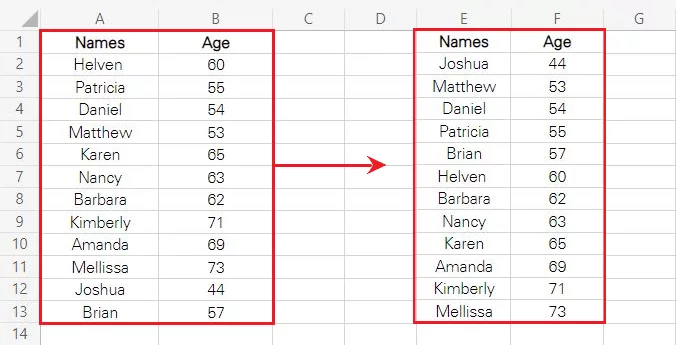
For people focusing on reporting and dashboards, this should be your first new feature to learn – see below how SORT can arrange an entire table with just one function.
Text Functions Are Becoming Much More Powerful
Excel has always had text functions, but you’d often need to build several formulas to handle a messy data set.
The old functions like FIND rely on exact positions, but with the new regex functions you can build one comprehensive pattern that works everywhere.
Now you can:
- Extract what you need every time from messy data
- Replace or restructure text with one formula
- Work with inconsistent formats easily
All because of regex (or regular expressions) support.
Regex lets you describe what the text you want looks like, not just exactly where it is. Instead of counting characters and building several formulas for different formats, you can search for patterns in the data.
If you know what you are looking for and what it looks like, you’ll be able to pull it out easily.
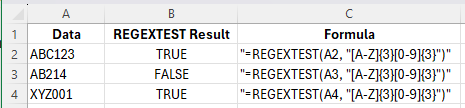
Anyone who spends a lot of time cleaning up data should start here, with our REGEXTEST guide that teaches you how to think in this new way.
Importing Data Is Smoother Than Ever Before
So we know you can clean and analyse data easier, but what about importing it?
Thankfully, Microsoft added some amazing new functions – IMPORTTEXT and IMPORTCSV.
We all know what it’s like when you have a set of data to put in Excel, but the import wizard just can’t figure out how to bring it across!
These new functions are designed to make bringing that external data in as smooth as possible.
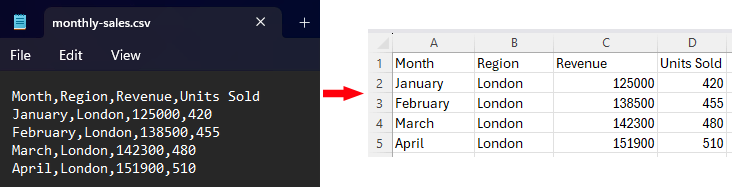
They are flexible functions that let you bring data straight into your sheet, specifying which rows you want, what the delimiter is, and how to encode it.
For our Excel pros who know there’s a lot of time being wasted each week just importing data, check out our IMPORTTEXT and IMPORTCSV guide.
What’s Next?
These 3 new tools let you import, clean and sort data much quicker than the old-school methods, but what else is Microsoft up to?
Well as you can see in Microsoft’s 2026 roadmap, AI is going to be a big deal.
There’s a brand new =COPILOT Function on the way – that’s what we are most excited to see!
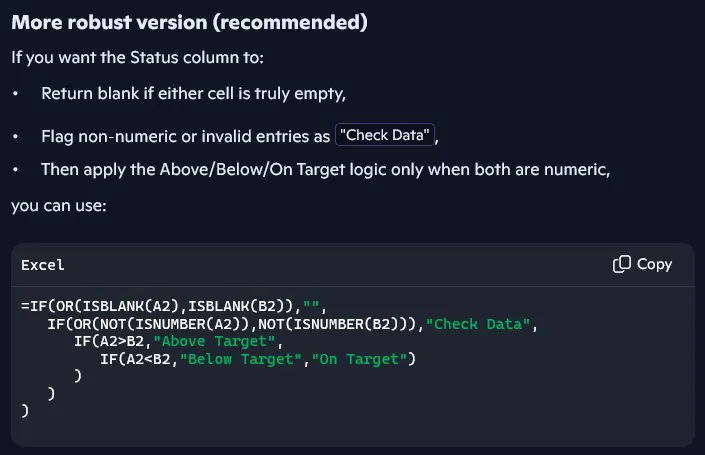
This function will let you generate, classify and summarise both text and data, all from a natural language prompt. The moment this functions goes live, we’ll be covering how to use it and when.
All you have to do is give it your prompt, and the data you want it to apply to – very exciting!
AI has been an incredible advancement, but now it’s getting more and more refined, we expect it to become a core part of how we use Excel in 2026.
Conclusion
Excel is still all over the place, both for personal and business use, but it isn’t the same old software we know and love.
These new features aren’t just more efficient versions of old ones, they completely change the way you approach things.
If you haven’t dug into these features much, then you definitely should! We built this guide to help direct people to the place that matters most to them, so you can dip your toe in without getting too lost.
So please go for it! Dig into one of these tools, and start changing the way you use Excel.
- Facebook: https://www.facebook.com/profile.php?id=100066814899655
- X (Twitter): https://twitter.com/AcuityTraining
- LinkedIn: https://www.linkedin.com/company/acuity-training/