

Excel Training for Beginners – Where to Start
Contents
Learning Excel can feel intimidating at first: endless rows, formulas, ribbons, and features everywhere.
But here’s the good news: anyone can master Excel with the right structure and teaching.
Whether you’re completely new to spreadsheets or just looking to get more confident, the fastest path is guided, hands-on training built around real workplace tasks.
That’s exactly how our Beginner Excel Courses at Acuity Training are designed – helping you go from “Where do I start?” to “I can do this!” in a single day.

Why Learning Excel Properly Matters
Most people pick up Excel by trial and error. They spend hours formatting, copying, and Googling formulas – without ever learning the foundations that make Excel fast and reliable.
While that works in the short term, it often leads to inconsistent, error-prone spreadsheets.
Structured Excel training changes that by teaching you how to organise and clean data properly, design formulas that are reliable, and present information clearly. You’ll also pick up time-saving shortcuts and best practices used by professionals every day.
Once these foundations are in place, you’ll spend less time fixing mistakes and more time using Excel to get meaningful work done – from budgets and reports to client updates and dashboards.
The Common Beginner Challenges
We see the same frustrations from learners who come to our Excel classes every week:
-
“I don’t know where to start.” The menus and icons feel overwhelming.
-
“I can’t remember my formulas.” You know what you want to do, but not how to do it.
-
“My spreadsheets look messy.” You’ve never been shown layout best practices.
-
“I’m scared to make mistakes.” You worry about breaking something or deleting data.
Our trainers tackle these challenges head-on.
Every session uses real-world business examples – like expense trackers, sales reports, and timesheets, so you can see immediately how each skill applies to your day-to-day work.
What You’ll Learn in Our Beginner Excel Training
Our Excel Training for Beginners focuses on the essentials that make the biggest difference straight away.
The beginner course focuses on the essentials that make the biggest difference straight away. You’ll start by learning how Excel is structured: understanding workbooks, worksheets, cells, and ranges, and how to navigate confidently.
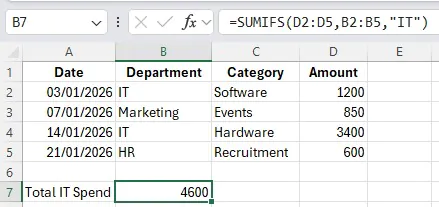
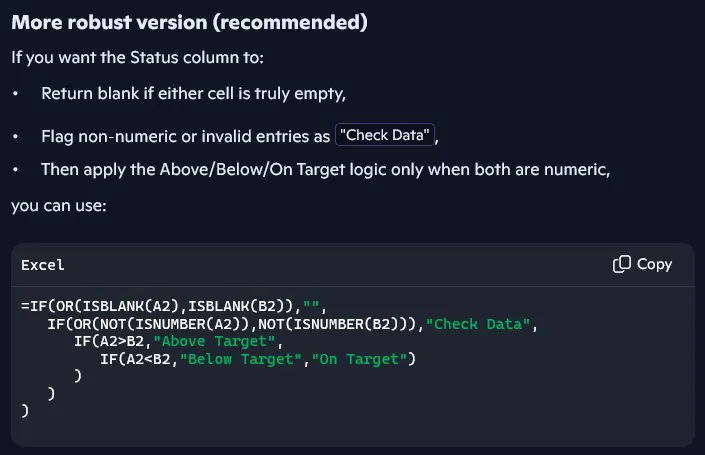
You’ll then learn to enter and format data efficiently, applying professional layouts that make information clear and consistent. As you move into formulas and functions, we explain each step carefully, covering essential tools such as SUM, AVERAGE, MIN, MAX, and IF. You’ll also understand the difference between absolute and relative references, a core Excel skill that helps prevent common formula errors.
The course then moves on to presenting data effectively, teaching you how to turn raw information into clear tables and charts and how to use conditional formatting to highlight key trends. Finally, we share the time-saving shortcuts and troubleshooting techniques that professionals rely on every day: including how to fix formula errors and audit your work to make sure it’s accurate.
By the end of the day, you’ll not only know how to use Excel – you’ll understand why certain methods work better, giving you a solid foundation for more advanced skills later.
Flexible Learning Options Across the UK
We know every learner is different. That’s why Acuity Training offers three flexible formats:
1: Classroom Training – Small, instructor-led groups in London, Guildford, Manchester, and other UK locations.
2: Live Online Training – Join interactive sessions from anywhere, with screen-sharing and personal guidance.
3: Onsite Corporate Training – We’ll come to your office and tailor the content to your team’s needs.
Each session is CPD-accredited and led by experienced trainers who teach Excel daily to professionals across finance, marketing, operations, and admin roles.

What Makes Acuity Training Different
Many “beginner friendly” Excel courses simply run through features. Ours focus on building confidence through practice. Every topic is taught by an experienced instructor and reinforced with hands-on exercises in Excel, not just demonstrations.
Our small class sizes ensure that you get personal feedback and support throughout the day. We also provide post-course materials and a free resit option if you’d like to refresh your skills later. And because every course is CPD-certified, you’ll leave with a recognised qualification that reflects your new skills.
Real-World Skills You’ll Use Immediately
By the end of your training, you’ll be able to build reliable spreadsheets from scratch, create quick reports and charts for meetings, automate calculations, and avoid the common mistakes that make spreadsheets unreliable.
You’ll work faster, make fewer errors, and approach every task with more confidence: exactly the kind of practical competence employers value in every role.
Ready to Get Started?
Learning Excel properly will save you hours of frustration and help you stand out in any role.
At Acuity Training, you’ll gain:
-
A clear, structured introduction to Excel
-
Practical experience using real-world files
-
Personal feedback and post-course support
-
A CPD-accredited certificate to prove your new skills
Whether you join online or in person, you’ll leave feeling confident and capable.
- Facebook: https://www.facebook.com/profile.php?id=100066814899655
- X (Twitter): https://twitter.com/AcuityTraining
- LinkedIn: https://www.linkedin.com/company/acuity-training/